![[Java] Generic 제네릭](https://img1.daumcdn.net/thumb/R750x0/?scode=mtistory2&fname=https%3A%2F%2Fblog.kakaocdn.net%2Fdna%2FdywwAG%2FbtrnPBXRgYe%2FAAAAAAAAAAAAAAAAAAAAAIahlEtFPm9pYj9J8NlWWrh65YkHrPcbtnibvt8i3NfP%2Fimg.jpg%3Fcredential%3DyqXZFxpELC7KVnFOS48ylbz2pIh7yKj8%26expires%3D1769871599%26allow_ip%3D%26allow_referer%3D%26signature%3DqrUwRhPVItcFAvclXhyUTPWqy%252B0%253D)
와일드카드의 상한과 하한 제한
다음 예제에는 프로그래머의 실수가 존재한다. 그러나 컴파일 과정에서는 이 실수가 드러나지 않는다. 실수가 컴파일 과정에서 발견될 수 있도록 매개변수 선언을 수정하자. 그리고 프로그래머의 실수를 바로잡자.
class Box<T> {
    private T ob;
    public void set(T o) { ob = o; }
    public T get() { return ob; }
}

class BoundedWildcardDemo {
    public static void addBox(Box<Integer> b1, Box<Integer> b2, Box<Integer> b3) {
        b3.set(b1.get() + b2.get());	// 프로그래머의 실수가 있는 부분
    }

    public static void main(String[] args) {
        Box<Integer> box1 = new Box<>();
        box1.set(24);
        Box<Integer> box2 = new Box<>();
        box2.set(37);
        Box<Integer> result = new Box<>();
        result.set(0);

        addBox(result, box1, box2);    // result에 24 + 37의 결과 저장
        System.out.println(result.get());    // 61 출력
    }
}
▶▶▶
class Box<T> {
    private T ob;
    public void set(T o) { ob = o; }
    public T get() { return ob; }
}

class BoundedWildcardDemo {
    public static void addBox(Box<? super Integer> b1, Box<? extends Integer> b2, Box<? extends Integer> b3) {
        b1.set(b2.get() + b3.get());
    }

    public static void main(String[] args) {
        Box<Integer> box1 = new Box<>();
        box1.set(24);
        Box<Integer> box2 = new Box<>();
        box2.set(37);
        Box<Integer> result = new Box<>();
        result.set(0);

        addBox(result, box1, box2);    // result에 24 + 37의 결과 저장
        System.out.println(result.get());    // 61 출력
    }
}
? extends T
다음 예제에는 프로그래머의 실수가 존재한다. 그러나 컴파일 과정에서는 이 실수가 드러나지 않는다. 실수가 컴파일 과정에서 발견될 수 있도록 매개변수 선언을 수정하자. 그리고 프로그래머의 실수를 바로잡자.
class Box<T> {
    private T ob;
    public void set(T o) { ob = o; }
    public T get() { return ob; }
}

class BoundedWildcardGeneric {
	// box에 con과 동일한 내용물이 들었는지 확인
    public static <T> boolean compBox(Box<T> box, T con) {
        T bc = box.get();
        box.set(con);		// 프로그래머의 실수로 삽입된 문장, 때문에 내용물이 바뀐다.
        return bc.equals(con);
    }

    public static void main(String[] args) {
        Box<Integer> box1 = new Box<>();
        box1.set(24);

        Box<String> box2 = new Box<>();
        box2.set("Poly");

        if(compBox(box1, 25))
            System.out.println("상자 안에 25 저장");

        if(compBox(box2, "Moly"))
            System.out.println("상자 안에 Moly 저장");

        System.out.println(box1.get());
        System.out.println(box2.get());
    }
}
▶▶▶
class Box<T> {
    private T ob;
    public void set(T o) { ob = o; }
    public T get() { return ob; }
}

class BoundedWildcardGeneric {
    public static <T> boolean compBox(Box<? extends T> box, T con) {
        T bc = box.get();
        // box.set(con);
        return bc.equals(con);
    }

    public static void main(String[] args) {
        Box<Integer> box1 = new Box<>();
        box1.set(24);

        Box<String> box2 = new Box<>();
        box2.set("Poly");

        if(compBox(box1, 25))
            System.out.println("상자 안에 25 저장");

        if(compBox(box2, "Moly"))
            System.out.println("상자 안에 Moly 저장");

        System.out.println(box1.get());
        System.out.println(box2.get());
    }
}
Generic 관련 내용
1. 프레임워크(Framework) 란?
잘 정의된 약속된 구조나 골격.
2. 자바에서 말하는 프레임워크?
잘 정의된 약속된 구조의 클래스 틀
3. 자료구조(Data Structures)?
자료구조는 데이터의 저장과 관련이 있는 학문으로서, 검색 등 다양한 측면을 고려하여 효율적인 데이터의 저장 방법을 연구하는 학문.
4. 알고리즘(Algorithms)
알고리즘은 저장된 데이터의 일부 또는 전체를 대상으로 진행하는 각종 연산을 연구하는 학문.
5. 자료구조에서 정형화하고 있는 데이터의 저장방식 예.
배열(Array), 리스트(List), 스택(Stack), 큐(Queue), 트리(Tree), 해시(Hash) 등
6. 알고리즘 예?
정렬(Sort), 탐색(Search), 최대(Max) 최소(Min) 검색
7. 컬렉션?
컬렉션은 데이터의 저장, 그리고 이와 관련있는 알고리즘을 구조화 해 놓은 프레임워크이다.
쉽게는 자료구조와 알고리즘을 클래스로 구현해 놓은 것 정도로 생각해도 좋다.
때문에 컬렉션 클래스들을 가리켜 ‘컨테이너 클래스’라고도 한다.
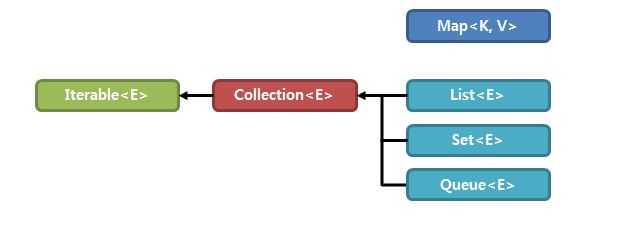
8. 컬렉션 프레임 워크의 인터페이스 구조
Collection<E> Map<K,V>
↑ ↑ ↑
Set<E> List<E> Queue<E>
9. 컬렉션이 프레임워크인 이유?
인터페이스 구조를 기반으로 클래스들이 정의되어 있기 때문에 프레임워크라 하는 것이다.
10. List<E> 인터페이스와 이를 구현하는 제네릭 클래스
ArrayList<E>, LinkedList<E>
11. List<E> 인터페이스를 구현하는 제네릭 클래스들은 다음 두 가지 특성을 공통으로 지닌다.
- 동일한 인스턴스의 중복저장을 허용한다.
- 인스턴스의 저장순서가 유지된다.
ArrayList - 예제1
import java.util.ArrayList;

public class Person {
	private String name;
	private int age;
	public Person(String name, int age) {
		this.name = name;
		this.age = age;
	}

	public void showInfo()
	{
		System.out.println("이름 " + name);
		System.out.println("나이 " + age);
	}
}
public class PersonMain {

	public static void main(String[] args) {
		ArrayList<Person> list = new ArrayList<Person>();
		list.add(new Person("홍길동", 20));
		list.add(new Person("슈퍼맨", 25));
		list.add(new Person("배트맨", 30));

		for(Person person : list)
			person.showInfo();
	}

}
ArrayList - 예제2 (phoneInfo의 배열을 ArrayList로 바꾸기)
|
1
2
3
4
5
6
7
8
9
10
11
12
13
14
15
16
17
18
19
20
21
22
23
24
25
26
27
28
29
30
31
32
33
34
35
36
37
38
39
40
41
42
43
44
45
46
47
48
49
50
51
52
53
54
55
56
57
58
59
60
61
62
63
64
65
66
67
68
69
70
71
72
73
74
75
76
77
78
79
80
81
82
83
84
85
86
87
88
89
90
91
92
93
94
95
96
97
98
99
100
101
102
103
104
105
106
107
108
109
110
111
112
113
114
115
116
117
118
119
120
121
122
123
124
125
126
127
128
129
130
131
132
133
134
135
136
137
138
139
140
141
142
143
144
145
146
147
148
149
150
151
152
153
154
155
156
157
158
159
160
161
162
163
164
165
166
167
168
169
170
171
172
173
174
175
176
177
178
179
180
181
182
183
184
185
186
187
188
189
190
191
192
193
194
195
196
197
198
199
200
201
202
203
204
205
206
207
208
209
210
211
212
213
214
215
216
217
218
219
220
221
222
223
224
225
226
227
228
229
230
231
232
233
234
235
236
237
238
239
240
241
242
243
244
245
246
247
248
249
250
251
252
253
254
255
256
257
258
259
260
261
262
263
264
265
266
267
268
269
270
271
272
273
274
275
276
277
278
279
280
281
282
283
284
285
286
287
288
289
290
291
292
293
294
295
296
297
298
299
300
301
302
303
304
305
306
307
308
309
310
311
312
313
314
315
316
317
318
319
320
321
322
323
324
325
326
327
328
329
330
331
332
333
334
335
336
337
338
|
import java.util.Scanner;
public class PhoneInfo {
private String name;
private String phone;
PhoneInfo(String name, String phone)
{
this.name = name;
this.phone = phone;
}
public String getName()
{
return name;
}
public void showPhoneInfo()
{
System.out.println("이름 : " + name);
System.out.println("전화번호 : " + phone);
}
}
public class PhoneUnivInfo extends PhoneInfo {
private String major;
private int year;
PhoneUnivInfo(String name ,String phone, String major, int year)
{
super(name, phone);
this.major = major;
this.year = year;
}
public void showPhoneInfo()
{
super.showPhoneInfo();
System.out.println("전공 : " + major);
System.out.println("학년 : " + year);
}
}
public class PhoneCompanyInfo extends PhoneInfo {
private String company;
PhoneCompanyInfo(String name ,String phone, String company)
{
super(name, phone);
this.company = company;
}
public void showPhoneInfo()
{
super.showPhoneInfo();
System.out.println("회사 : " + company);
}
}
public interface PhoneMenuString {
int INPUT_PHONEINFO = 1;
int SEARCH_PHONEINFO = 2;
int DELETE_PHONEINFO = 3;
int SHOW_ALL_PHONEINFO = 4;
int PROGRAM_QUIT = 5;
int GENERAL = 1;
int UNIVERCITY = 2;
int COMPANY = 3;
int YES = 1;
int NO = 2;
}
public class MenuChoiceException extends Exception {
private int choice;
MenuChoiceException(int choice)
{
super("유효하지 않은 메뉴 값입니다.");
this.choice = choice;
}
public void showWrongMenu()
{
System.out.println( choice + "에 해당하는 선택은 존재하지 않습니다.");
System.out.println("메뉴 선택을 처음부터 다시 진행합니다.");
}
}
public class PhoneBook {
private static PhoneBook pb;
private PhoneInfo[] pInfo;
private int cntOfPhone;
private int sizePhoneInfo;
private PhoneBook(int sizePhoneInfo)
{
pInfo = new PhoneInfo[sizePhoneInfo];
cntOfPhone = 0;
this.sizePhoneInfo = sizePhoneInfo;
}
public static PhoneBook getPhoneBookInst(int sizePhoneInfo)
{
if(pb == null)
pb = new PhoneBook(sizePhoneInfo);
return pb;
}
public void inputPhoneInfo(PhoneInfo pInfo)
{
int i = 0, j=0;
if(cntOfPhone >= sizePhoneInfo)
{
System.out.println("더 이상 저장할 수 없습니다.");
return;
}
for(i=0;i<cntOfPhone;i++)
{
if(this.pInfo[i].getName().compareTo(pInfo.getName()) > 0)
{
for(j=cntOfPhone-1;j>=i;j--)
{
this.pInfo[j+1] = this.pInfo[j];
}
break;
}
}
this.pInfo[i] = pInfo;
cntOfPhone++;
}
public void searchPhoneInfo(String name)
{
int result = search(name);
if(result != -1)
pInfo[result].showPhoneInfo();
else
System.out.println("찾으시는 데이터가 없습니다.");
}
public void deletePhoneInfo(int idx)
{
int i=0;
for(i=idx;i<cntOfPhone-1;i++)
pInfo[i] = pInfo[i+1];
pInfo[i] = null;
cntOfPhone--;
System.out.println("삭제가 완료되었습니다.");
}
public int search(String name)
{
for(int i=0;i<cntOfPhone;i++)
{
if(pInfo[i].getName().compareTo(name) == 0)
return i;
}
return -1;
}
public void showAllPhoneInfo()
{
for(int i=0;i<cntOfPhone;i++)
pInfo[i].showPhoneInfo();
}
}
public class PhoneUI {
private static final int MAX_CNT=100;
public static Scanner sc = new Scanner(System.in);
private static PhoneBook pb = PhoneBook.getPhoneBookInst(MAX_CNT);
private PhoneUI(){}
public static void mainMenu()
{
System.out.println("선택하세요...");
System.out.println("1. 데이터 입력");
System.out.println("2. 데이터 검색");
System.out.println("3. 데이터 삭제");
System.out.println("4. 모든 데이터 보기");
System.out.println("5. 프로그램 종료");
System.out.print("선택 : ");
}
public static void inputMenu()
{
System.out.println("1. 일반, 2. 대학, 3. 회사");
}
public static void inputMenuChoice() throws MenuChoiceException
{
int choice=0;
choice = sc.nextInt();
sc.nextLine();
if(choice < PhoneMenuString.GENERAL || choice > PhoneMenuString.COMPANY)
throw new MenuChoiceException(choice);
switch(choice)
{
case PhoneMenuString.GENERAL:
inputGeneralPhoneInfo();
break;
case PhoneMenuString.UNIVERCITY:
inputUniversityPhoneInfo();
break;
case PhoneMenuString.COMPANY:
inputCompanyPhoneInfo();
break;
}
}
public static void inputGeneralPhoneInfo()
{
String name;
String phone;
System.out.println("데이터 입력을 시작합니다.");
System.out.print("이름 : ");
name = sc.nextLine();
System.out.print("전화번호 : ");
phone = sc.nextLine();
System.out.println("데이터 입력이 완료되었습니다.");
pb.inputPhoneInfo( new PhoneInfo(name, phone) );
}
public static void inputUniversityPhoneInfo()
{
String name;
String phone;
String major;
int year;
System.out.println("데이터 입력을 시작합니다.");
System.out.print("이름 : ");
name = sc.nextLine();
System.out.print("전화번호 : ");
phone = sc.nextLine();
System.out.print("전공 : ");
major = sc.nextLine();
System.out.print("학년 : ");
year = sc.nextInt();
sc.nextLine();
System.out.println("데이터 입력이 완료되었습니다.");
pb.inputPhoneInfo( new PhoneUnivInfo(name, phone, major, year) );
}
public static void inputCompanyPhoneInfo()
{
String name;
String phone;
String company;
System.out.println("데이터 입력을 시작합니다.");
System.out.print("이름 : ");
name = sc.nextLine();
System.out.print("전화번호 : ");
phone = sc.nextLine();
System.out.print("회사 : ");
company = sc.nextLine();
System.out.println("데이터 입력이 완료되었습니다.");
pb.inputPhoneInfo( new PhoneCompanyInfo(name, phone, company) );
}
public static void searchPhoneInfo()
{
String name;
System.out.println("데이터 검색을 시작합니다.");
System.out.println("검색하시고자 하는 이름을 입력하세요.");
name = sc.nextLine();
pb.searchPhoneInfo(name);
}
public static void deletePhoneInfo()
{
String name;
int result=0;
int answer=0;
System.out.println("검색하시고자 하는 이름을 입력하세요.");
name = sc.nextLine();
result = pb.search(name);
if(result != -1)
{
System.out.println("정말 삭제하시겠습니까? 1. Yes 2. No");
answer = sc.nextInt();
sc.nextLine();
switch(answer)
{
case PhoneMenuString.YES:
pb.deletePhoneInfo(result);
break;
case PhoneMenuString.NO:
break;
default:
System.out.println("잘못 누르셨습니다.");
}
}
else
System.out.println("삭제하시려는 데이터가 없습니다.");
}
public static void showAllPhoneInfo()
{
pb.showAllPhoneInfo();
}
}
public class PhoneMain {
public static void main(String[] args)
{
int choice=0;
while(true)
{
try
{
PhoneUI.mainMenu();
choice = PhoneUI.sc.nextInt();
PhoneUI.sc.nextLine();
if(choice < PhoneMenuString.INPUT_PHONEINFO || choice > PhoneMenuString.PROGRAM_QUIT)
throw new MenuChoiceException(choice);
switch(choice)
{
case PhoneMenuString.INPUT_PHONEINFO:
PhoneUI.inputMenu();
PhoneUI.inputMenuChoice();
break;
case PhoneMenuString.SEARCH_PHONEINFO:
PhoneUI.searchPhoneInfo();
break;
case PhoneMenuString.DELETE_PHONEINFO:
PhoneUI.deletePhoneInfo();
break;
case PhoneMenuString.SHOW_ALL_PHONEINFO:
PhoneUI.showAllPhoneInfo();
break;
case PhoneMenuString.PROGRAM_QUIT:
return;
}
}
catch(MenuChoiceException e)
{
System.out.println(e.getMessage());
e.showWrongMenu();
}
}
}
}
|
cs |
ArrayList & LinkedList
1. ArrayList<E>의 특징
* 저장소의 용량을 늘리는 과정에서 많은 시간이 소요된다.
* 데이터의 삭제에 필요한 연산과정이 길다.
* 데이터의 참조가 용이해서 빠른 참조가 가능하다.
2. LinkedList<E> 특징
* 저장소의 용량을 늘리는 과정이 간단하다.
* 데이터의 삭제가 매우 간단하다.
* 데이터의 참조가 다소 불편하다.
ArrayList<E> 클래스의 용량(버퍼) 설정
ArrayList<E> 클래스는 저장되는 데이터의 수가 증가함에 따라서, 용량(데이터 저장 가능한 용량)이 자동으로 증가하는 클래스이다.
그런데 용량을 증가시키는 과정에서 수반되는 연산으로 인해 때로는 성능에 부담이 되기도 한다. 때문에 대략 500여 개의 데이터가 저장 될 것이 예상되는 상황에서는 점진적으로 용량을 500으로 늘리기 보다 처음부터 용량을 500으로 잡음으로 인해서 불필요한 연산을 줄일 필요도 있다.
물론 ArrayList<E>의 메소드 중에는 저장용량의 설정을 위한 메소드가 존재한다. 따라서 여러분은 API 문서를 참조하여 이 메소드를 찾기 바란다. 그리고 다음 조건을 만족시키는 코드를 각각 구성해 보기 바란다.
* Integer 인스턴스를 저장할 수 있는 ArrayList<E>를 생성하고 저장용량을 500으로 늘린다.
* ArrayList<E>에 저장되어 있는 인스턴스 수의 두 배로 저장용량을 늘린다.
public void ensureCapacity(int minCapacity);

ArrayList<Integer> list = new ArrayList<Integer>();
list.ensureCapacity(500);
list.ensureCapacity(list.size()*2);
ArrayList<E> vs LinkedList<E>
아래에서 제시하는 상황에 적절한 자료구조를 선택해 보자. ArrayList<E>와 LinkedList<E> 둘 중 하나를 선택하면 된다.
* 상황1
저장하게 되는 데이터의 수가 대략적으로 예측 가능하며, 빈번한 데이터의 참조가 일어나는 상황에서
유용하게 사용할 수 있는 컬렉션 클래스는 무엇인가?
>>> ArrayList<E>
* 상황2
저장하게 되는 데이터의 수가 예측 불가응하며, 빈번한 데이터의 저장 및 삭제가 일어나는 상황에서
유용하게 사용할 수 있는 컬렉션 클래스는 무엇인가?
>>> LinkedList<E>
LinkedList<E> 예제
SoSimpleLinkedListImpl.java 소스를 분석하여 메모리 맵을 그려 보시오.
class Box<T>
{
	public Box<T> nextBox;
	T item;

	public void store(T item) { this.item=item; }
	public T pullOut() { return item; }
}

class SoSimpleLinkedListImpl
{
	public static void main(String[] args)
	{
		Box<String> boxHead=new Box<String>();
		boxHead.store("First String");

		boxHead.nextBox=new Box<String>();
		boxHead.nextBox.store("Second String");

		boxHead.nextBox.nextBox=new Box<String>();
		boxHead.nextBox.nextBox.store("Third String");

		Box<String> tempRef;

		/* 두 번째 박스에 담긴 문자열 출력 과정 */
		tempRef=boxHead.nextBox;
		System.out.println(tempRef.pullOut());

		/* 세 번째 박스에 담긴 문자열 출력 과정 */
		tempRef=boxHead.nextBox;
		tempRef=tempRef.nextBox;
		System.out.println(tempRef.pullOut());
	}
}
Collection 상속 관계도


HashSet 예제
다음 클래스의 두 인스턴스를 HashSet<E>에 저장할 때, 두 인스턴스의 데이터(name & age)가 완전히 동일하다면,
하나만 저장되도록 hashCode 메소드와 equals 메소드를 오버라이딩 하자.
import java.util.HashSet;
import java.util.Iterator;

class Person
{
	String name;
	int age;

	public Person(String name, int age)
	{
		this.name = name;
		this.age = age;
	}
	public String toString()
	{
		return name + "(" + age + "세)";
	}
}

class PersonMain
{
	public static void main(String[] args)
	{
		HashSet<Person> hSet = new HashSet<Person>();
		hSet.add(new Person("이진호", 10));
		hSet.add(new Person("이진호", 20));
		hSet.add(new Person("김명호", 20));
		hSet.add(new Person("김명호", 15));
		hSet.add(new Person("이진호", 20));
		hSet.add(new Person("김명호", 20));

		System.out.println("저장된 데이터 수 : " +  hSet.size());

		Iterator<Person> itr = hSet.iterator();
		while(itr.hasNext())
			System.out.println(itr.next());
	}
}
인스턴스의 내용비교가 되도록 적절히 오버라이딩 되었다면, 다음의 실행결과를 보여야 한다. 단 이름과 나이 정보가 출력되는 순서는 hashCode 메소드의 구현에 따라 다를 수 있다. 아니 대부분 다를 것이다.
저장된 데이터 수 : 4
김명호(20세)
김명호(15세)
이진호(10세)
이진호(20세)
▶▶▶
import java.util.HashSet;
import java.util.Iterator;

class Person
{
	String name;
	int age;

	public Person(String name, int age)
	{
		this.name = name;
		this.age = age;
	}
	public String toString()
	{
		return name + "(" + age + "세)";
	}
	public int hashCode()
	{
		return name.hashCode() + age%7;
	}
	public boolean equals(Object obj)
	{
		Person cmp = (Person)obj;
		if(cmp.name.equals(name) && cmp.age == age)
			return true;
		else
			return false;
	}
}

class PersonMain
{
	public static void main(String[] args)
	{
		HashSet<Person> hSet = new HashSet<Person>();
		hSet.add(new Person("이진호", 10));
		hSet.add(new Person("이진호", 20));
		hSet.add(new Person("김명호", 20));
		hSet.add(new Person("김명호", 15));
		hSet.add(new Person("이진호", 20));
		hSet.add(new Person("김명호", 20));

		System.out.println("저장된 데이터 수 : " +  hSet.size());

		Iterator<Person> itr = hSet.iterator();
		while(itr.hasNext())
			System.out.println(itr.next());
	}
}
TreeSet 예제
TreeSet으로 Lotto 한 세트를 만들어 출력하는 프로그램.
실행결과
[1, 7, 12, 25, 34, 45]
- tree : 정렬을 해주는 형태
- set : 중복을 허용하지 않기 때문에 겹치지 않는 난수를 발생시킬 수가 있는 것
▶▶▶
import java.util.Iterator;
import java.util.TreeSet;

class LottoTreeSet
{
	public static void main(String[] args)
	{
		Random rand = new Random();
		TreeSet<Integer> lotto = new TreeSet<Integer>();

		while(set.size() < 6)
		{
			int num = (int)(Math.Random()*45) +1;
			set.add(num);
		}
		System.out.println(set);
	}
}
compareTo 예제
compareTo 메소드 한 줄로
import java.util.Iterator;
import java.util.TreeSet;

class Person implements Comparable<Person>
{
    String name;
    int age;

    public Person(String name, int age)
    {
        this.name=name;
        this.age=age;
    }
    public void showData()
    {
    	System.out.printf("%s %d \n", name, age);
    }
    public int compareTo(Person p)
    {
        if(age>p.age)
            return 1;
        else if(age<p.age)
            return -1;
        else
            return 0;
    }
}

class ComparablePerson
{
	public static void main(String[] args)
	{
		TreeSet<Person> sTree=new TreeSet<Person>();
		sTree.add(new Person("Lee", 24));
		sTree.add(new Person("Hong", 29));
		sTree.add(new Person("Choi", 21));

		Iterator<Person> itr=sTree.iterator();
		while(itr.hasNext())
			itr.next().showData();
	}
}
▶▶▶
import java.util.Iterator;
import java.util.TreeSet;

class Person implements Comparable<Person>
{
    String name;
    int age;

    public Person(String name, int age)
    {
        this.name=name;
        this.age=age;
    }
    public void showData()
    {
    	System.out.printf("%s %d \n", name, age);
    }
    public int compareTo(Person p)
    {
//        if(age>p.age)
//            return 1;
//        else if(age<p.age)
//            return -1;
//        else
//            return 0;
    	return age - p.age;
    }
}

class ComparablePerson
{
	public static void main(String[] args)
	{
		TreeSet<Person> sTree=new TreeSet<Person>();
		sTree.add(new Person("Lee", 24));
		sTree.add(new Person("Hong", 29));
		sTree.add(new Person("Choi", 21));

		Iterator<Person> itr=sTree.iterator();
		while(itr.hasNext())
			itr.next().showData();
	}
}